
Make every frame
worth showing.
A good-looking title cannot rescue a cut-off product photo or a payment sheet. Use these checks, illustrated with real LaunchCut material, before you publish an app promo.
Start with a complete product view, then isolate a meaningful detail. Remove payment and private screens, match the background to the source, and make the promise agree with the interface. Finally inspect the exported MP4, not only the editor preview.
Filling a frame can lose the point.
Both frames use the same Pose product screen. Fit preserves it; fill crops it to cover a square. This is a composition illustration, not a new generated result.
Check your own screenshot ↗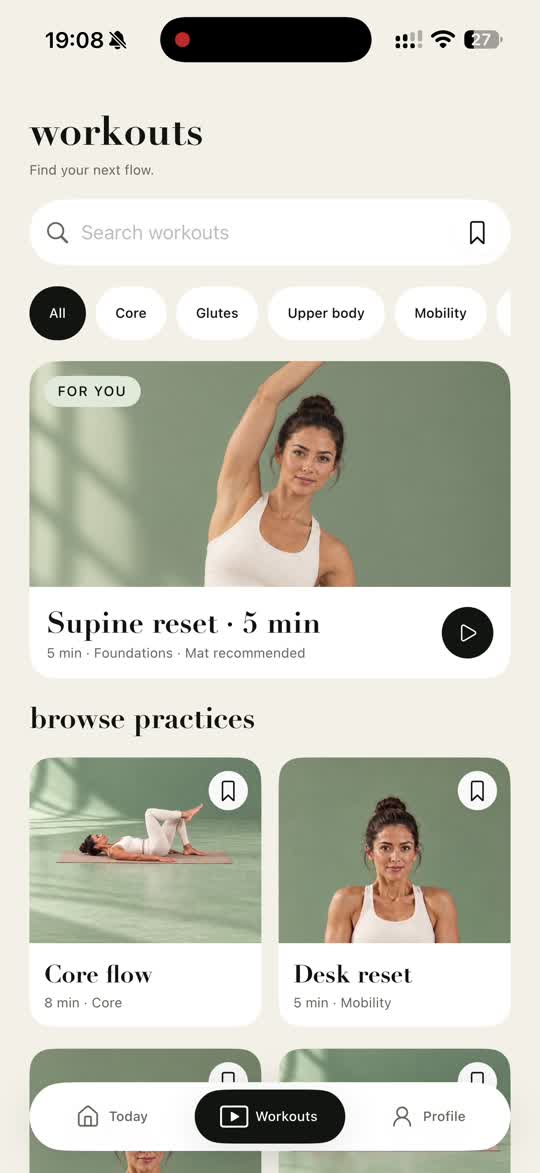
A close-up cuts through the important subject
A detail view should retain the entire meaningful object: a meal, face, result card or chart label. First establish the complete screen, then move closer. The fit/fill illustration on this page uses the same Pose source image in both frames; fill removes information to cover a square. This is a layout demonstration, not an automatically corrected video.
Onboarding or a paywall becomes the hero
Subscriptions, keyboards, permission requests and account screens can be present in the recording without contributing to the story. Make a clean capture rather than relying entirely on automatic filtering. Inspect the selected frames before confirmation and deselect anything private or irrelevant; automated selection can still miss an overlay.
The background competes with the product
Use the product’s main colors as a starting point and leave enough contrast for its interface and copy. An unrelated stock scene or a different color in every shot can distract from what the app actually does. In the Pose Standard export, a restrained green environment connects the product and the composition. A generated shot is useful only if it belongs to that same story.
The result is too small to understand
A whole desktop dashboard in a vertical frame may be technically complete but practically unreadable. Show one relevant region with enough context, then test it at the size someone will watch. Do not claim a tiny label is readable just because the export is 1080P. Use the free layout tool to inspect a real screenshot before making a new creation.
The headline promises more than the screen proves
Use a concrete action or outcome your product supports. A practice library can show finding a session; it does not prove medical results or a transformation. Likewise, a dashboard mockup does not demonstrate real revenue or customers. Review generated text, claims, URLs and product details yourself.
Only the editor preview gets checked
Watch the complete downloaded MP4 with sound and muted. Check the opening, transitions, full photos, small type, music and final invitation. Preview the upload on the target platform before publishing because controls and placements can obscure copy. Copy the matching post draft, review its claims and community rules, then publish manually. Download your work within 24 hours.
Have these ready.
- One clear product benefit in the opening.
- Complete important subjects before deliberate close-ups.
- No payment, keyboard, notification or private account screens.
- Readable copy and a background that supports the source.
- A working next-step link and reviewed social post.
- The downloaded MP4 checked with sound and muted.
Questions before you start
Does fitting the whole screen remove its status bar?
No. Fit changes the layout, not the source content. Remove unwanted material in preparation or review the studio’s framing before export.
Will Enhanced automatically fix a weak recording?
No. Its planned generated shot adds an expressive option, but it cannot make missing evidence or inaccurate claims true. Clean source material and final review are still necessary.
Do the creative reference films prove every website output looks the same?
No. The case pages label supplied or separately produced creative references and actual website exports separately. Inspect the actual export and choose a story your own product can support.
Take the brief into your film.
Standard 30 credits · Enhanced 60 credits · Manual editing, MP4 export and downloads included.
Make my film